Unboxing the OpenMoko/FreeRunner including the spares kit, debug board
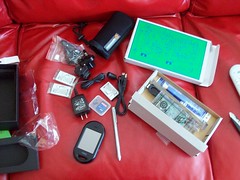
My FreeRunner (along with debug board and spares kit) has just arrived today. A few people have already unboxed FreeRunners, but I haven't seen any pictures of the debug bored so I figured I'd show:
I've been playing around with getting it to register on AT&T and T-Mobile. T-Mobile worked with my first SIM card, which was no big surprise. Given the difficulties with the Neo1973 and AT&T SIM cards I wanted to try it on AT&T, which was less of a success. Of my 3 AT&T 3G SIM cards, 2 of them worked, and one had a bit of difficulty:
Some words of advice to wrap up the pictures, when following the getting started with your FreeRunner guide, if you are behind a router there is a chance your ethernet connection is 192.168.*.*, you can get around this by just running:
since it looks for the most specific route first :). One last parting word of advice, if you are in the USA you probably want to use the phone on T-Mobile for now since AT&T apparently still has some unresolved issues.
The full set of photos I took unboxing the OpenMoko/FreeRunner are here
I'm planning on writing some code for this, but honestly it is about #3 on my project list for the time being. I'm thinking about writing an auto network configurator for GPRS settings, but I'm going to have to look at what functionality the existing network configurator provides and now to plug into it.
I've been playing around with getting it to register on AT&T and T-Mobile. T-Mobile worked with my first SIM card, which was no big surprise. Given the difficulties with the Neo1973 and AT&T SIM cards I wanted to try it on AT&T, which was less of a success. Of my 3 AT&T 3G SIM cards, 2 of them worked, and one had a bit of difficulty:
r
# Register
EVENT: Netreg searching for network
EVENT: Netreg registration denied
Some words of advice to wrap up the pictures, when following the getting started with your FreeRunner guide, if you are behind a router there is a chance your ethernet connection is 192.168.*.*, you can get around this by just running:
route add 192.168.0.202 usb0
since it looks for the most specific route first :). One last parting word of advice, if you are in the USA you probably want to use the phone on T-Mobile for now since AT&T apparently still has some unresolved issues.
The full set of photos I took unboxing the OpenMoko/FreeRunner are here
I'm planning on writing some code for this, but honestly it is about #3 on my project list for the time being. I'm thinking about writing an auto network configurator for GPRS settings, but I'm going to have to look at what functionality the existing network configurator provides and now to plug into it.

Comments
CAN YOU ACTUALLY CALL SOMEONE AND IF SO WHAT IS IT LIKE?
I haven't played around with anything besides that, I'm still looking into what settings I need to do the medianet tunnelling, but once I get that sorted I'll write a script for people to use for the win.
Got stuck with the AT&T SIM Card. Have been trying various things..
But at the end shows CRE Error : 32
:(
I will have to call AT&T and play dumb...
Install your SIM card in the other phone before you use freerunner.
Every time I've got "registering..." forever message, I shutdown freerunner, switch my SIM card, turn the other phone on, off, switch it back.
I don't know why and how it works.
just working around...